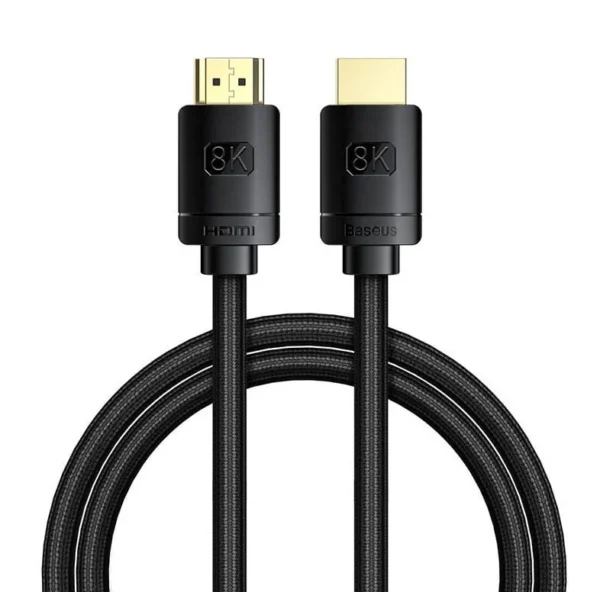
Baseus HDMI 8K Adapter Cable 10m Black
₦50,000.00
26 people are viewing this right now

Guaranteed safe & secure checkout
Questions
Description
Description
Baseus HDMI 8K Adapter Cable Black
Unlock the full potential of your 8K devices with the Baseus High Definition Series HDMI 8K to HDMI 8K Adapter Cable. Measuring 5 meters in length, this premium cable provides ample reach for connecting your devices without compromising on quality. Moreover, it is ideal for home theaters, gaming setups, and professional environments, ensuring you enjoy crisp, clear, and immersive visuals. Additionally, the robust construction guarantees durability, making it a reliable choice for various applications.
Key Features:
- 8K Resolution Support: This cable delivers stunning video quality with support for up to 8K resolution, thereby providing an unparalleled viewing experience.
- High-Speed Data Transfer: With a high data transfer rate, this cable ensures smooth and uninterrupted video playback, even for the most demanding content.
- Durable Construction: Made with high-quality materials, this cable is designed to withstand frequent use and provide long-lasting performance.
- 5-Meter Length: The generous length allows for flexible placement of your devices, making it perfect for large rooms and complex setups.
- Universal Compatibility: Compatible with all HDMI-enabled devices, including TVs, monitors, gaming consoles, and more, ensuring versatile use.
Specifications:
- Type: HDMI 8K to HDMI 8K Adapter Cable
- Resolution Support: Up to 8K
- Length: 10 meters
- Color: Black
- Material: High-quality PVC and copper for durability and superior signal transmission
- Connector Type: HDMI male to HDMI male
What’s in the Box:
Usage Instructions:
- Connection: First, plug one end of the cable into your HDMI-enabled source device (e.g., gaming console, Blu-ray player). Next, ensure the connection is secure, and then proceed to connect the other end into your HDMI-enabled display device. Finally, verify that both devices are powered on and properly configured to complete the setup.
- Setup: First, ensure both devices are powered on. Then, proceed to select the appropriate HDMI input on your display device. Afterward, you can begin enjoying high-definition content seamlessly.
- Maintenance: Keep the cable away from excessive bending and ensure connectors are kept clean and free from dust for optimal performance.
Related products


CHARGE SYNC CABLE BLACK
₦2,500.00

CHARGE SYNC CABLE WHITE
₦2,500.00